Updated for new sponsors: See option 3,4 & 5 for newer versions of Java that bundle Amazon assist.
If you are like me and sick of uninstalling foist-ware like IAC Ask toolbar or McAfee Antivirus scanner, then here's a little trick to prevent future Java updates re-installing that pesky sponsored/bundled software.
If you are like me and sick of uninstalling foist-ware like IAC Ask toolbar or McAfee Antivirus scanner, then here's a little trick to prevent future Java updates re-installing that pesky sponsored/bundled software.
Previously the only option was install the offline edition of the Java installer.
Note: These registry settings also block other foist-ware, such as Google Toolbar / Chrome etc.
Option 1
Open Notepad and paste in the following text. Then save the file with a .reg extension. Exit Notepad and then double click the .reg file you just created. When prompted by the Registry Editor to Continue. Click "Yes".
Windows Registry Editor Version 5.00
[HKEY_LOCAL_MACHINE\SOFTWARE\JavaSoft]
"SPONSORS"="DISABLE"
[HKEY_LOCAL_MACHINE\SOFTWARE\Wow6432Node\JavaSoft]
"SPONSORS"="DISABLE"
Option 2
Press the [Windows Key] + R or select the start menu type and select the "run" shortcut. Then copy/paste the below lines into the "Run" window and select OK. Repeat the process for both lines.
reg ADD HKLM\SOFTWARE\JavaSoft /v SPONSORS /t REG_SZ /d DISABLE /f
reg ADD HKLM\SOFTWARE\Wow6432Node\JavaSoft /v SPONSORS /t REG_SZ /d DISABLE /f
Option 3
Edit the "C:\ProgramData\Oracle\Java\java.settings.cfg" file and add the line below.
SPONSORS=0
Option 4
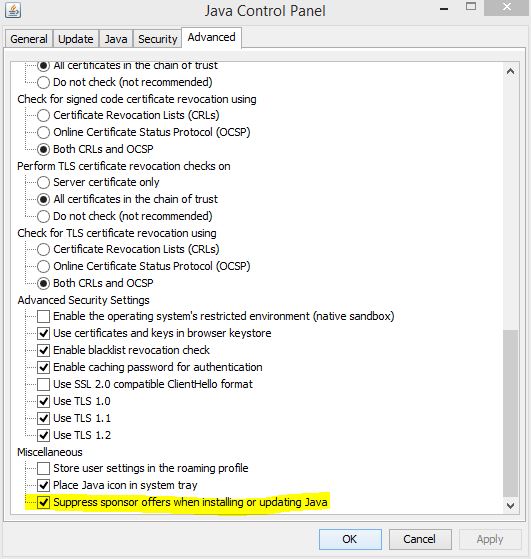
If a previous version is installed, Use the Configure Java GUI.

Option 5
Execute ssvagent.exe (with local admin rights) with the -disablesponsorofferings switch.
"C:\Program Files (x86)\Java\<version>\bin\ssvagent.exe" -disablesponsorofferings