Saturday, 11 June 2016

PrimalForms CE - Community Edition (Free)

Sapien make some great tools and this is no exception. PrimalForms Community Edition is a Free version that has limited functionality.

I've used this for several OSS projects and it covers the essentials. The link on Sapien sites no longer works so below is a alternative link I've found. This version is 1.0.9.0 but an version 1.0.10 was released also according to the blog. Only obvious change is it adds a start page.


Update: Unfortunately Sapien or one of their representatives has mistakenly slapped DMCA on this link for the free edition and I've removed it, rather than fight it.  You can certainly find it via Google or ask the right person ;-)

Details
Version 1.0.9.0 
Filename: PrimalFormsCE.exe
Signed By: Sapien Technologies, Inc.
File size: 4,689,920 bytes
MD5:A4C4AF9A49423133AA8AB4A7C5745C10
SHA1: B6DD673290F4DED363BD3A6B5787A5332BCC79A6
SHA256:F4BB718BAC1C1E309F92EF465702E933179D195217C3CE51B99E4936AEA1F8A7

Version 1.0.1.0 was released, but I'm yet to find a copy of it.

Wednesday, 12 June 2013

"Path too long" when trying to delete folder - Robocopy to the rescue

One of the many long running mysteries of Windows, is why it's possible to create deep nested directories/files (>256 characters), but not be able to delete/navigate them.

Deep nested (long) directory path, most often manifest around the use of shared folders or the subst command and it can be a hassle to deal with.

There's a few tools around that are designed to target this exact problem, but hiding on everyones system* is a great little program called Robocopy that is primarily designed for copying files. However it can be used to delete them as well.

Here's how you can delete those path too long directories easily, using a single robocopy command.
  • Create an Empty directory
  • Open a command prompt (cmd.exe) - Elevate if necessary.
    • Open the Start menu and type "cmd".
    • Right click the shortcut and select "Run as administrator" 
  • At the command prompt type "robocopy /PURGE <path-to-empty-directory>  <path-to-long-directory>.
    Double check the paths, else risk deleting the wrong files/directory
  • Hit Enter to start the process.
* Robocopy comes standard with Vista and above operating systems. If you are running XP or older, then you can obtain Robocopy as a part of the  Windows Server 2003 Resource Kit Tools

Tuesday, 28 May 2013

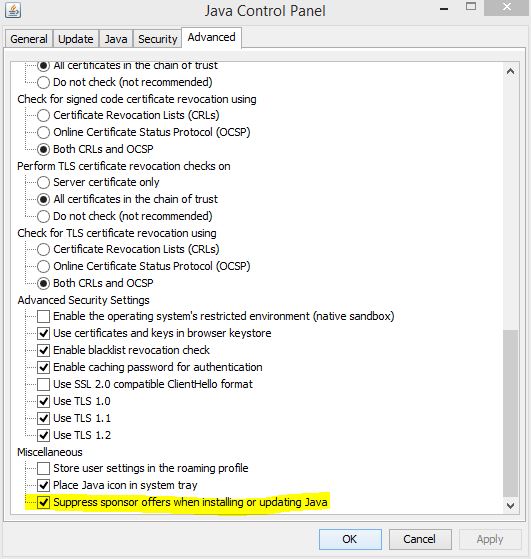
Prevent Java updates from installing sponsor apps and toolbars like Ask and McAfee

Updated for new sponsors: See option 3,4 & 5 for newer versions of Java that bundle Amazon assist.

If you are like me and sick of uninstalling foist-ware like IAC Ask toolbar or McAfee Antivirus scanner, then here's a little trick to prevent future Java updates re-installing that pesky sponsored/bundled software.

Previously the only option was install the offline edition of the Java installer.

Note: These registry settings also block other foist-ware, such as Google Toolbar / Chrome etc.

Option 1

Open Notepad and paste in the following text. Then save the file with a .reg extension. Exit Notepad and then double click the .reg file you just created. When prompted by the Registry Editor to Continue. Click "Yes".

Windows Registry Editor Version 5.00
[HKEY_LOCAL_MACHINE\SOFTWARE\JavaSoft]
"SPONSORS"="DISABLE"
[HKEY_LOCAL_MACHINE\SOFTWARE\Wow6432Node\JavaSoft]
"SPONSORS"="DISABLE"


Option 2

Press the [Windows Key] + R or select the start menu type and select the "run" shortcut. Then copy/paste the below lines into the "Run" window and select OK. Repeat the process for both lines.

reg ADD HKLM\SOFTWARE\JavaSoft /v SPONSORS /t REG_SZ /d DISABLE /f
reg ADD HKLM\SOFTWARE\Wow6432Node\JavaSoft /v SPONSORS /t REG_SZ /d DISABLE /f


Option 3

Edit the "C:\ProgramData\Oracle\Java\java.settings.cfg" file and add the line below.
SPONSORS=0

Option 4

If a previous version is installed, Use the Configure Java GUI.


Option 5

Execute ssvagent.exe (with local admin rights) with the -disablesponsorofferings switch.
"C:\Program Files (x86)\Java\<version>\bin\ssvagent.exe" -disablesponsorofferings

Saturday, 12 January 2013

Ricoh Card Reader drivers

Looking for the Ricoh card reader drivers? So was I. After a long winded search to locate these drivers, I thought post these here. These drivers are for Windows XP

rmedia.zip contains
  • RMEDIA.CAT
  • RMedia.inf ( 12/18/2002,1.03.00.02)
  • RMedia.sys


Ricoh RL5C476 CardBus Controller
Ricoh MediaCard Controller
Ricoh MediaCard DriverInstDisk

Ricoh MediaCard Controller
Ricoh SmartMedia Controller
Ricoh Memorystick Controller
Ricoh SD/MMC Controller

Driver supports the following hardware ID's

PCMCIA\RICOH-Bay_Controller-2AD9
PCMCIA\RICOH-Bay_Controller-3447
PCMCIA\RICOH-Bay_Controller-2EA3
PCMCIA\RICOH-Bay_Controller-1632
PCMCIA\RICOH-Bay_Controller-70E4
PCMCIA\RICOH-Bay_Controller-8360
PCMCIA\RICOH-Bay_Controller-6363
PCMCIA\RICOH-Bay_Controller-A962
PCMCIA\RICOH-Bay_Controller-ECD8
PCMCIA\RICOH-Bay_Controller-1E26
PCMCIA\RICOH-Bay_Controller-03CB
PCMCIA\RICOH-Bay1Controller-F03E
PCMCIA\RICOH-Bay2Controller-F960
PCMCIA\RICOH-Bay4Controller-CE3E 

Friday, 12 October 2012

How to uninstall Bigpond Security without the password

If you're unfortunate enough to have purchased this terrible product, only to find you cannot uninstall it as either your bigpond account no longer exists or you've forgotten the password, below is an easy way remove the password so, you can uninstall easily.

Note: if you are not familiar with using regedit, I suggest you seek advice from a professional. I take no responsibility for and damage or loss as a result of using the below guide.

These instruction apply to v1.5. Newer versions may differ.
  1. Open regedit (Start menu -> run) or shortcut Windows Key + R
  2. type in regedit and click okay
  3. Navigate through the registry tree and find the key below 

    [HKEY_LOCAL_MACHINE\SOFTWARE\Authentium\Curtains\v1.5]
  4. Find the values starting with LLC and rename them.
    ie.
    LLC_me@bigpond.com -> disabledLLC_me@bigpond.com
    LLCID -> disabledLLCID
  5.  Restart and then proceed with the uninstall without being prompted for the password.